
Daycare Waitlist Conversion Worksheet: Remove Duplicates and Match Start Dates
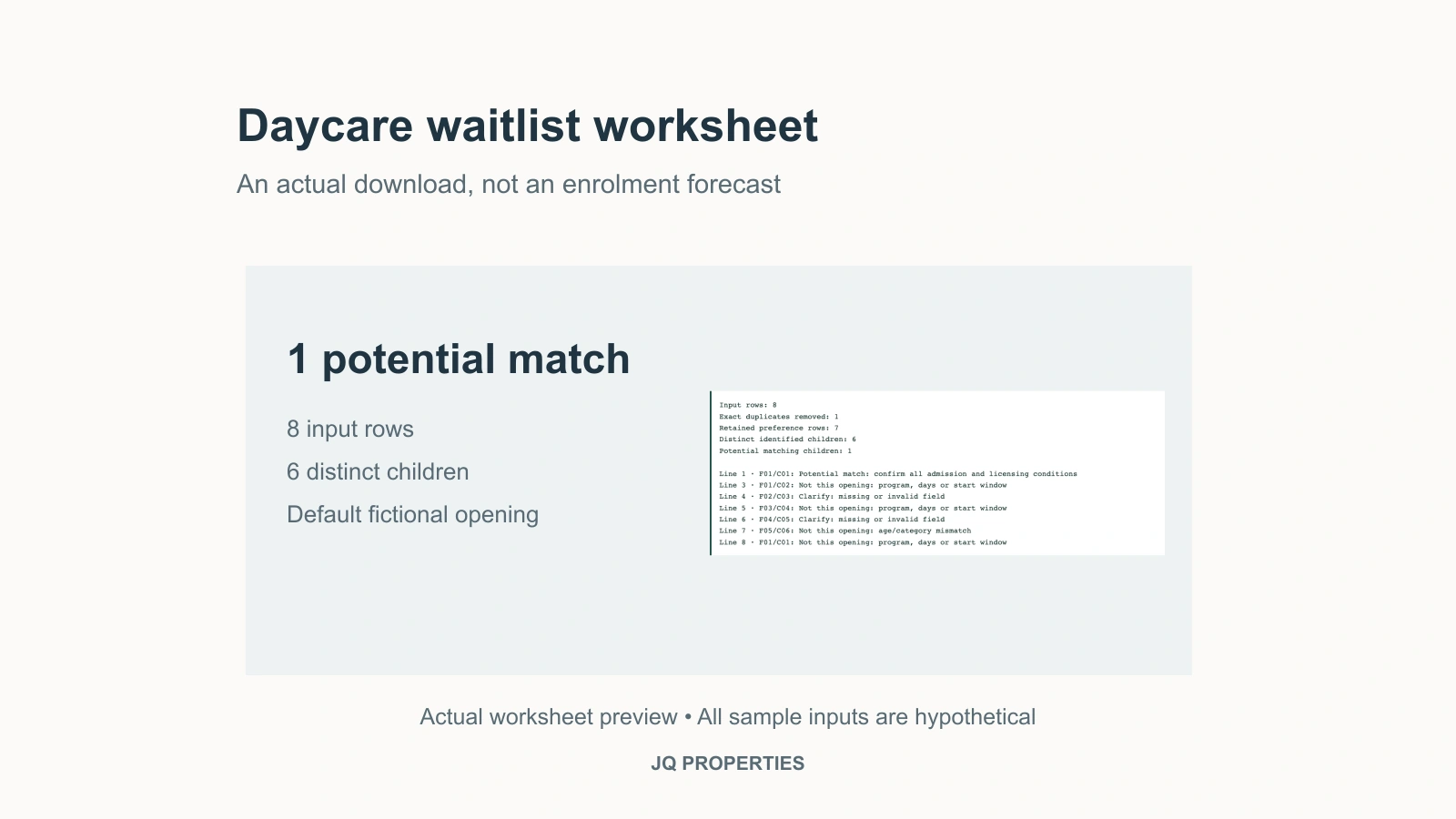
A daycare waitlist becomes useful when you can identify distinct children who might take a particular opening on a particular date. Counting rows is not enough: one child may appear twice, siblings may share a family contact, and a perfectly genuine inquiry may be for next spring rather than next month. Use the downloadable waitlist matching worksheet to separate those cases before treating the list as evidence of near-term demand.
Download the ZIP package, extract it and open the HTML worksheet in a modern browser. The worksheet runs locally in a browser and includes invented sample records. It produces a shortlist for follow-up, not an enrolment forecast, admission decision or licensing approval. It does not send messages, allocate places or calculate revenue.
Set the opening before cleaning the list
Start with a specific opening: the intended start date, licensed program and days available. “One space somewhere in the centre” is too vague. A Monday–Wednesday–Friday opening and a full-week request may not fit, even when the child's age is suitable.
In the worksheet, the default opening is October 15, 2026, in Group Child Care (30 Months to School Age), on Monday, Wednesday and Friday. Replace these example settings. The requested days must match the opening exactly in this deliberately conservative tool; a director can investigate other combinations afterwards. It does not assume that two part-time families can safely or commercially share a place.
The age input is the child's completed age in months on the proposed opening date, prepared by the operator from its own records. Do not use the age when the family joined the list. If the opening date changes, recalculate those ages before using the result. The worksheet makes you confirm that you have done so.
BC distinguishes licensed program categories, including under-36-month group care and 30-month-to-school-age group care. The latter is not simply an unrestricted room for everyone over 30 months. The actual program, group composition, supervision and licence conditions still need to fit. BC Child Care Licensing Regulation, section 2 and Schedule E.
Use child identifiers and family identifiers for different jobs
Give each family a pseudonymous code and each child a separate code. Two rows with family code F01 and child code C01 may be duplicate submissions. F01/C01 and F01/C02 are siblings, not duplicates. If those children need simultaneous starts, keep that dependency in the operator's private admission process. Two interested siblings do not equal two independently available enrolments.
The worksheet collapses exact repeated rows, ignoring surrounding spaces and the order of day codes. It then counts distinct family-and-child pairs. It retains different start windows or program preferences for the same child, but counts that child only once in the matching result. That is important when a family has said “October if possible, January otherwise.”
It does not guess whether two differently coded records belong to the same child. Nor should a buyer infer identity from a similar name. Ask the operator to resolve inconsistent identifiers in the source system. If the same child code appears with different family codes, or different ages appear for the same child in one run, the worksheet marks those records for clarification and does not shortlist them.
Empty fields should stay visible
A blank start date is not permission to start tomorrow. The example includes a child with no earliest start date; that record goes to “clarify” instead of being treated as immediately available. Invalid dates and an earliest date after the latest acceptable date are handled the same way.
The confirmation date records when the family last reconfirmed interest. Choose a recency threshold appropriate to the question; the default 60 days is a planning assumption, not a BC rule. A future confirmation date is invalid. An old or missing confirmation means follow-up is needed, not that the family has definitely left.
An inactive record stays out of the shortlist. A future start window goes into “not this opening,” even if it may be valuable later. This preserves the difference between a list that needs cleaning and demand that genuinely does not fit the current vacancy.
Read the sample result before adding your own records
With the supplied eight fictional rows, the worksheet finds one exact duplicate and seven retained preference rows covering six distinct children. Only F01/C01 matches the default opening. Its second, November preference stays visible, but does not create a second child. Its sibling C02 is retained separately and is looking for the other program.
C03 needs a missing start date clarified. C04 wants November, C05 has no confirmation date, and C06 is too old for its requested under-36-month category in the simplified screen. Those are different reasons to avoid multiplying the original row count by a monthly fee.
Try changing the selected program to under 36 months. C02 then becomes the potential match; C05 still needs confirmation. Try setting the earliest date after the latest date in one row: the worksheet should flag the row, not move it into demand. These small checks help you understand the output before using an anonymized extract.
The shortlist also does not test staffing, available group space, school status, exemptions or the number of children under 36 months in the older group. Even a correctly aged child may not fit the actual group on the start date. The Province describes licensed facilities as subject to requirements covering staffing, space and other operating conditions. BC explanation of child-care types.
Keep the transaction copy small and private
Do not paste names, birth dates, phone numbers, medical information or payment details into this worksheet. A buyer usually needs counts and fit, not a portable directory of families. Have the operator prepare the pseudonymous extract and keep the identifier key separately. Coded records may still be personal information if people can be identified from other available information.
BC's Personal Information Protection Act provides a limited business-transaction route for necessary disclosures, with conditions including a purpose-limited agreement. It is not a blanket right to obtain the entire family database. If the transaction does not complete, the applicable provision requires the prospective party to return or destroy the information. PIPA, section 20.
The worksheet has no network requests or automatic storage. You can copy the results or print the page; closing or refreshing it discards edits. Browser extensions, shared computers and downloaded or printed copies remain part of your own privacy controls. Keep a dated, restricted copy only where appropriate for the transaction.
Turn a shortlist into a better purchase question
Ask the seller to reconcile the shortlist with upcoming departures, accepted offers of care and actual starts. Record these as separate stages. A family who reconfirmed interest is not yet a signed enrolment, and a signed enrolment does not by itself establish collected revenue after a sale.
For the broader assessment of parent loyalty and recurring demand, read daycare reputation, waitlists and occupancy. This tool's narrower job is to make the list countable without losing siblings or promising seats that do not fit. If you are assessing a business acquisition, JQ-Properties can help organize the transaction questions around the operator's anonymized results; this article is not a list of daycares currently for sale.
By Justin Qiao, Personal Real Estate Corporation, Justin Qiao Group | RE/MAX Crest Realty.
General planning information checked September 8, 2026. Confirm actual admission and licensing decisions against the facility's current approvals.

